

Choose the view from data shape, not habit
The support case concerns large JSON data opened with a default Grid view. A data set with many child properties at one parent can consume significant processing and memory in a grid. Start with a text-oriented view when the structure or size makes an interactive grid a poor fit.
Set a text view for large data
The established JSONBuddy workflow distinguishes a standard text view and a Large File view. Set text as the default for large JSON, XML, or text data, then use the Large File option when the input exceeds the configured threshold.
Set and review the threshold
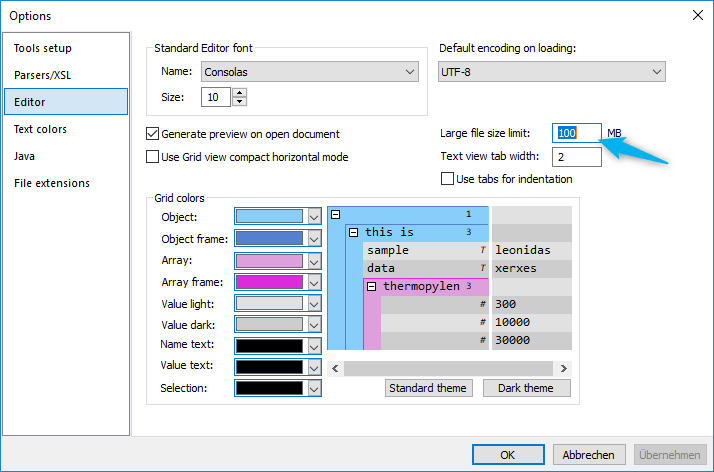
- Open the Options dialog and locate the Editor settings.
- Review the megabyte limit that determines when the standard view is used.
- Open a representative large file and confirm the selected view before editing or validating.
- Use a text view rather than assuming Grid view is suitable for every nested or wide document.
The older support example mentions hundreds of thousands of rows, several million lines, and files of several GB. These are experience reports rather than current capacity commitments; do not convert them into a product guarantee.
Keep the next action file-aware
Use large JSON to CSV when the goal is an extracted table, large JSON editor for the editing landing page, or large JSON processing to connect viewing, validation, formatting, and conversion.