

Keep referenced schema resources together
A JSON Schema validator needs a deliberate way to load and assign schema resources to JSON data. Selecting one root schema alone can be insufficient when that schema depends on related components through $ref and $id. The JSONBuddy workflow uses a schema pool to hold related JSON Schema files and designate one entry as the root.
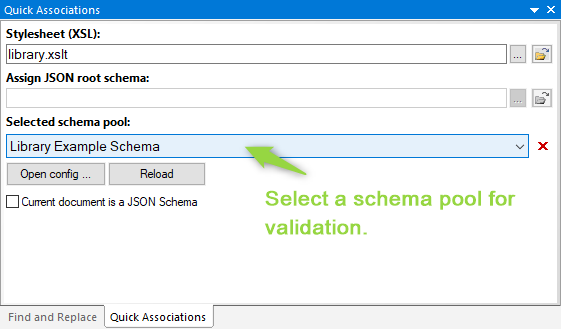
Select a pool for the active document
- Open the Quick Associations pane for the JSON document.
- Select a configured schema pool, or choose a local or remote path to the root schema as the alternative path.
- Confirm which mode is active; the interface disables the root-path field while a pool is selected.
- Clear an unwanted pool assignment with the documented clear control, then validate a representative document.
Check the saved association, remote resources, and diagnostics before using the selected pool for validation.
Edit the pool configuration deliberately
Edit the pool entries in the JSON editor, save the configuration, then use Reload in Quick Associations before testing the changed setup. Keep the configuration under source control when it represents a shared contract.
[
              {
              "id": "library-example",
              "title": "Library Example Schema",
              "version": 1,
              "rootIndex": 0,
              "entries": [
              "SchemaPools/Library/library_schema_root.json",
              "SchemaPools/Library/library_schema_book.json"
              ]
              }
              ]
The fields identify the pool, its display title, the zero-based root entry, and local or remote schema-document paths. Relative local paths are resolved from the configuration-file location.
Verify resolution before trusting a result
- Open a JSON instance that should pass and one that should fail.
- Confirm the intended root schema and resolved references are used.
- Record the pool configuration revision with the validation result.
- Use the JSON Schema tester when the same setup must run against a managed collection.
Continue with resource-aware schema work
Use the JSON Schema library article to explore available schemas, inspect resolved references, or return to the JSON Schema editor to refine the contract.