

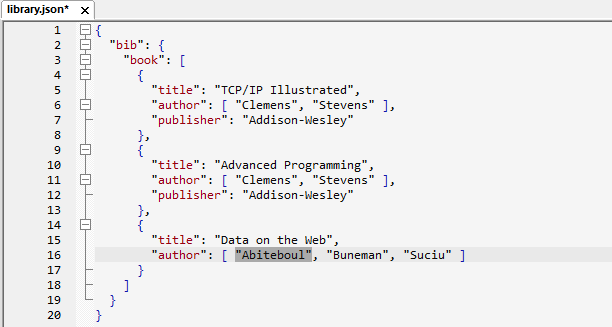
Make structure visible before editing
Compact JSON can be valid but difficult to scan. Pretty-print adds consistent whitespace so object boundaries, arrays, property names, and values are easier to review without changing the underlying JSON data.

Apply JSON pretty-print
- Open the intended JSON document and retain an unchanged copy when the source is important.
- Run the documented JSON | Pretty-print JSON command.
- Inspect objects, arrays, escaped text, and the current selection before saving.
- Run the required syntax or schema validation separately; readable formatting does not prove validity.
Use the menu label, shortcut, indentation settings, and selection behavior in the product.
Expect formatting to follow content
That adaptive presentation is useful for reading, but exact line wrapping can vary with content and release behavior. Compare data rather than requiring byte-for-byte whitespace.
Return to the value you were editing
The workflow records the selected property in navigation history and documents backward and forward navigation commands. Verify those commands and shortcuts before relying on it, especially when formatting a large or deeply nested document.
Continue the formatting workflow
See JSON prettify for interactive, file, CLI, and current Web API access, choose spaces for indentation, or follow the pretty-print Help topic.