

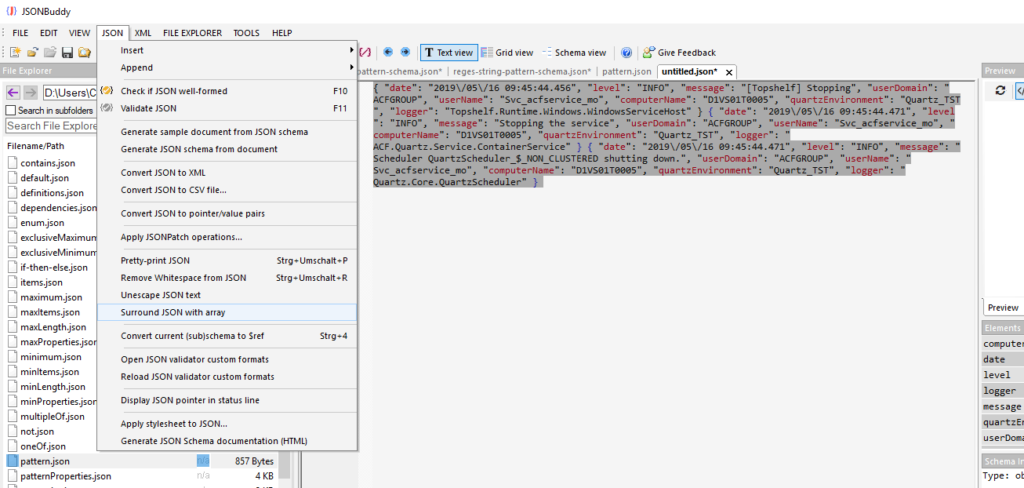
Identify the log shape before validation
A log described as “JSON” may be a sequence of independently written JSON objects rather than one complete JSON array or object. An editor can correctly report a format issue when it is asked to interpret that sequence as a single JSON document. First inspect the beginning and boundary between entries so the input structure is clear.
Surround a sequence with a JSON array
- Open the log data and confirm that consecutive entries are JSON objects.
- Select the relevant entries, or use the whole document when the sequence is the complete input.
- Use the Surround with JSON array command.
- Review the resulting array, then pretty-print or inspect it in the editor.
Review the result as data, not only text
Once the sequence is a well-formed array, use the text or Grid view that suits its size and shape. Validate the resulting JSON before treating it as a faithful representation of the source log. Preserve the original log separately: surrounding entries for review changes the document structure and should not overwrite operational evidence.
Continue with an appropriate workflow
Use large-data view guidance for sizeable logs, JSON pretty-print for formatting, or JSON validation to inspect structural errors after preparation.