A user sent me an inquiry about opening large JSON data in JSONBuddy. This can be indeed a little bit tricky if the default view for JSON data is set to the Grid view in the editor settings. Not all data is suitable to be displayed in the Grid view. JSON with a lot of child properties at the same parent could take a lot of processing time and memory if you want to show the JSON as Grid in the editor. So the user wanted to get some help:
I don’t believe this is a fault in your software, as all other editors seem to be overwhelmed by the 450,000 rows as well… I was just curious if you had any tips that may help improve the performance of this application…. As without better performance, I cannot justify purchasing a license.
And I replied:
450,000 rows in total is not that much as I’m frequently working with files with several millions of lines. I recommend to use the text view modes of JSONBuddy (and XML ValidatorBuddy) if you are working with really large files. Using the text view, the editor supports two modes. The standard view which loads all of the file content and the Large File view which always only keeps parts of the content in memory.
Set the default view to text for large data
As a first step set the text view as the default view for your large (JSON, XML or any text format) data. Please learn more about thishere.
Set a limit in MB for the Large File text view in the editor
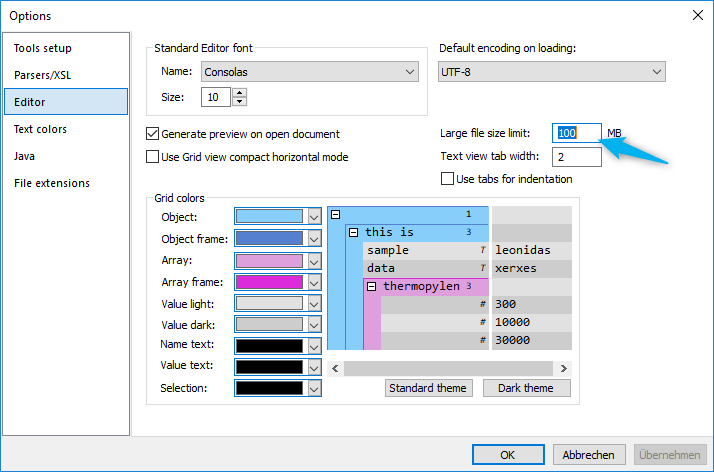
How can you set the limit for the Large File view? There is a setting in the Options dialog on the Editor page which sets the limit in megabytes for using the standard view:
Option to set the limit for the Large File view
Any file larger than the limit will be loaded in the Large File view. Using the Large File view it is no problem to browse files even with a size of several GBs. Please note that you would need a plus license of XML ValidatorBuddy (a Plus version of JSONBuddy with support for large file editing will be available in the near future) if you want to edit the file as well. In general, avoid the Grid view for large data and use the Large File view in the text editor.